Google Drive Direct Link Generator

The Google Drive Direct Download Link Generator tool enables you to create a direct link for files you have stored on Google Drive.

How to Get Your Google Drive Sharing URL

Follow these simple steps to get your Google Drive sharing link.

1

Upload Your File

First, upload the file you want to share to Google Drive.

2

Click “Get Link”

Right-click on the uploaded file and click on the “Get link” option.
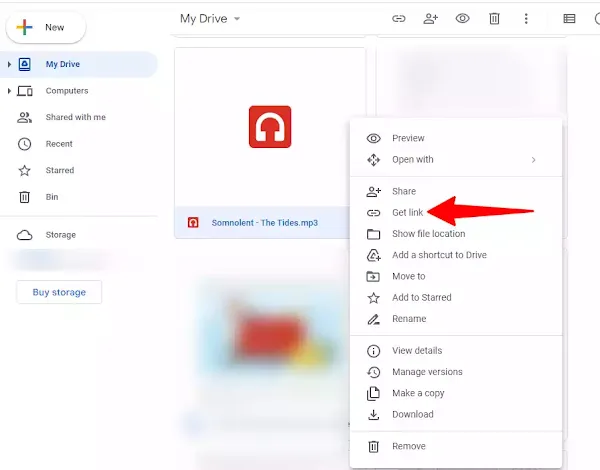
Google Drive Get Link Option
3

Change the Visibility

Change the visibility settings from “Restricted” to “Anyone with the link”.

4

Copy the File Preview Link

Once the sharing permissions have been updated, copy the Google Drive file preview link.
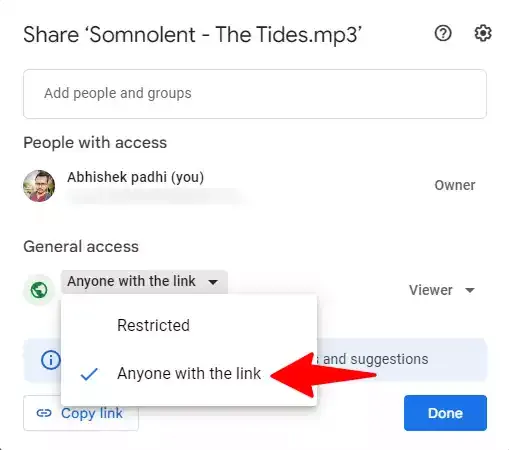
Copy Google Drive Share Link
5

Generate Your Direct Download Link

Now paste the copied link here and generate your direct download link.

This direct link skips the preview page and directly initiates the download of the file.

This is especially useful for:

Bloggers sharing downloadable resources
Developers hosting files
Affiliate marketers sharing assets
Course creators offering PDFs or tools

I hope you found this Google Drive direct download link Tool helpful. If you need any more help, contact us here.
FAQs

Yes, this tool is completely free with no hidden charges.

Using direct links improves both user experience and performance:

  • Time-saving – no extra steps for users
  • Faster downloads – skips unnecessary preview pages
  • Better UX – one click = download
  • Professional look – cleaner links in websites & emails
  • Higher conversions – especially for lead magnets & downloads

Make sure your file permission is set to “Anyone with the link.”

If your file is restricted, the direct link will not work. Make sure to set sharing access to “Anyone with the link” before generating the download URL.

Yes, but Google may show a warning before downloading large files.

Yes. This tool does not store or track your links.

No, this tool does not shorten links. It converts your link into a direct download format. You can use URL shorteners separately if needed.

Yes, you can easily use these links on your website, blog, landing pages, or email campaigns to allow users to download files instantly.

Google Drive allows large file uploads (up to 5 TB per file), but when using direct download links, very large files may trigger warnings or temporary restrictions.

Yes, Google Drive has a download quota limit. If a file is downloaded too many times in a short period, it may show a message like “Download quota exceeded”.

The download restriction usually resets within 24 hours, but it depends on Google’s internal limits and traffic.

Yes, direct links may stop working if:

  • Google restricts access due to high traffic
  • File permissions are changed
  • File is deleted